


I value an editing brief that protects the product first. A new setting is useful only when the packaging shape, label placement, and color still match the item we actually sell.

Product Team Example
Ecommerce Seller

Fast Image Editing With Native 2K Detail
Krea 3 brings fast, natural language image editing to creative production. Developed by Krea, the Krea 3 AI Image Editor is designed to change backgrounds, outfits, materials, and lighting while keeping the details you want to preserve. Explore its native 2K output, character consistency, and product fidelity, then try a related workflow with an available SeeAPI image tool. Direct access to this model on SeeAPI has not been confirmed.

Start with a photograph, describe a focused change, and review the result. These steps apply to available SeeAPI image tools; model features and reference limits depend on your selected tool.

Open the SeeAPI image workspace and select Image to Image. Upload a clear source photograph with visible faces, labels, and edges. Choose an available editing model; this introduction does not enable the Krea 3 AI Image Editor on SeeAPI.

Enter an English prompt that names the change and the details to preserve. Select only the image size and resolution offered by your chosen model, review Required Credits, and click Generate Image. Add references only when that tool supports them.

Review the finished image before downloading from the result controls. Check facial identity, product geometry, packaging text, and shadows at full size. If a detail drifts, simplify your instruction and generate another version, keeping the original photograph available for comparison.
Krea 3 Image Editing focuses on controlled changes to existing visuals. The images here are AI-generated editorial illustrations of editing scenarios, not verified outputs or performance benchmarks of the named model.
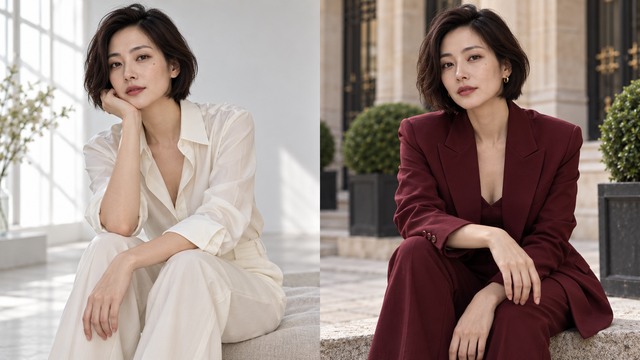
The Krea 3 AI Image Editor accepts up to six reference images in Krea’s documented workflow. Use them to explain which person, garment, object, or visual style should guide an edit. Name each reference and its role, then specify the features that should stay: face shape, hairstyle, expression, skin tone, or a recognizable accessory. Consistent Character Editing is useful for fashion concepts, portrait variations, and campaign sequences that need the same person across different settings. Krea 3 aims to maintain identity as poses, clothing, and surroundings change, but results still need careful review. The six-image capability describes the developer’s model, rather than an upload allowance currently verified for SeeAPI.
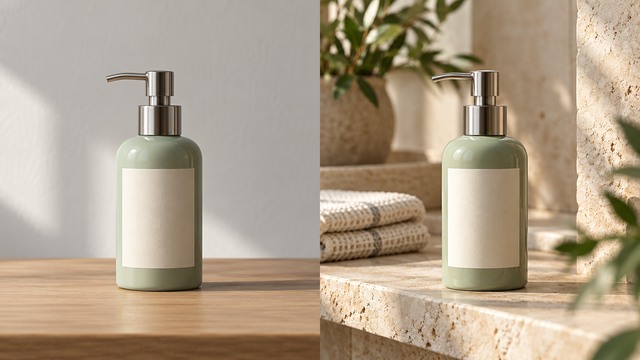
The Krea 3 AI Image Editor is built for quick iteration at native 2K resolution. Krea reports that most edits finish in under eight seconds in its own testing; this is not a guaranteed SeeAPI turnaround. For a product scene, ask for a new background while preserving bottle proportions, cap shape, packaging colors, label placement, and logo alignment. Krea 3 can help turn a plain packshot into a lifestyle concept without deliberately redesigning the product. Native 2K Image Editing also gives teams more detail to inspect around edges, glass, and fine surfaces. It does not guarantee flawless small text. Check the image at full size before approving it, and judge lighting, contact shadows, and reflections as carefully as the background itself.
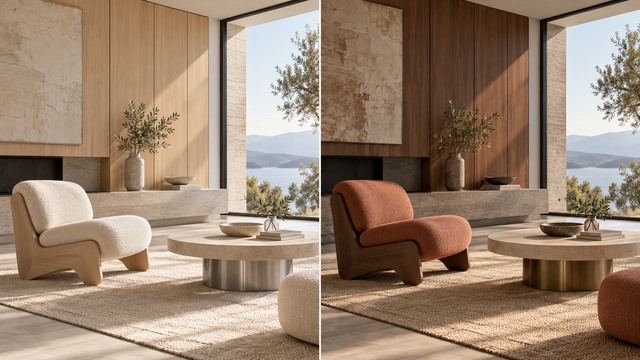
The Krea 3 AI Image Editor can follow a focused instruction to change upholstery, wood finish, metal tone, or the direction and softness of light. Tell it to retain the camera angle, room geometry, furniture proportions, and untouched objects. That makes Precise Image Editing valuable when a team wants to discuss one design decision without rebuilding the entire scene. Krea 3 also supports reference-led architectural material studies, where a palette or source image communicates the intended finish. Describe tactile qualities such as matte walnut, brushed brass, or woven linen rather than relying on a color name alone.

The Krea 3 AI Image Editor helps explore AI Product Photography concepts around an existing subject. Keep the product silhouette and brand identity fixed while testing compositions, seasonal props, or a different environment. Krea 3 is especially relevant when the creative task is a specific revision to approved photography. Write the invariants first, describe the intended scene next, and finish with practical photographic direction. For example, request soft window light, realistic contact shadows, and a clean focal point. Compare each result with the source rather than assuming a polished image is an accurate one.
Use the Krea AI Image Editor approach to make targeted revisions from a strong source image. These four workflows cover product teams, photographers, designers, creators, and architects.
Krea 3 can help sellers imagine a product in a studio setup, a home, or a seasonal campaign scene. Begin with a sharp packshot and preserve the packaging silhouette, cap, label position, and material finish. The Krea 3 AI Image Editor is relevant to catalog variations where the item must remain recognizable. Review fine print and product dimensions before using any edited image in a listing.

Krea 3 gives marketing teams a way to explore new environments, formats, and visual moods around an existing concept. For localized marketing materials, specify which text should change and which brand elements must stay fixed. The Krea 3 AI Image Editor can support creative variations, but translated words, offer details, and legal text still need human checking. Keep the approved source and compare layouts, color accuracy, and product treatment before adapting the image for a regional campaign or social channel.

Krea 3 can guide wardrobe changes, background adjustments, and portrait lighting ideas while aiming to keep the person recognizable. Photographers and social creators can describe a new outfit or setting, then identify the facial features, hairstyle, and expression to retain. The Krea 3 AI Image Editor is most useful when references and instructions agree. Inspect eyes, hands, jewelry, and fabric boundaries before sharing a result.
Krea 3 can help architects and interior designers compare surfaces, furnishings, and lighting within a consistent composition. Describe the furniture or finish to change and explicitly retain the architecture, camera viewpoint, and surrounding objects. The Krea 3 AI Image Editor can translate a material direction into a visual concept for discussion. Use clear descriptions of grain, sheen, weave, and color temperature.
The following fictional role-based examples describe what creative teams may value in an editing workflow. They are placeholders, not real customer testimonials, verified model results, or endorsements of SeeAPI availability.
I value an editing brief that protects the product first. A new setting is useful only when the packaging shape, label placement, and color still match the item we actually sell.
The appeal of the Krea 3 AI Image Editor is a consistent person across visual ideas. I would compare facial features and styling carefully before choosing images for a finished series.

Focused background changes make campaign reviews easier. I want to see different creative directions while keeping the approved subject and brand cues stable enough for a useful comparison.

A clear source photograph and a precise prompt help everyone discuss the same revision. I prefer reviewing a few controlled variations over sorting through a collection of unrelated concepts.

Material previews are most helpful when the room and viewpoint stay fixed. That gives clients a practical way to discuss texture, finish, and atmosphere without confusing the design itself.

I want a new visual mood without losing the recognizable subject. Checking the result against the original helps me catch small changes before I use a concept in a post.

Understand the documented model capabilities, practical limitations, and current SeeAPI availability before choosing an image editing workflow.
Krea 3 is an AI Image Editing Model developed by Krea and announced on October 15, 2026. The Krea 3 AI Image Editor takes existing visual inputs and natural language instructions to revise scenes, products, people, and materials. Its documented strengths include native 2K output, support for up to six reference images, and an emphasis on preserving details outside the requested change. This is an image editor, not a standalone video model.
Explore what the Krea 3 AI Image Editor approach can bring to your next product, portrait, or campaign brief. Start with the image tools currently available on SeeAPI, upload a clear photograph, describe the changes, and review the selected model’s settings and credits before generating. Direct access to this model is not confirmed.