Explore Qwen Image 2.1 freeGive Your Next Idea a Visual Starting Point
Discover a Qwen Image editor for image creation and editing.
Looking for Qwen Image 2.1 free access? Start with a clear idea: a character, a product scene, or an illustration you want to explore. Describe the subject, mood, and composition, then evaluate the result against your brief. Use this Qwen Image editor guide to plan your first experiment with Qwen Image 2.1 free options. Free availability, credits, and enabled features depend on the service and current account terms.
Qwen Image 2.1
Explore the Creative Possibilities of Qwen Image 2.1 free
Give each experiment a purpose. These Qwen Image editor workflows cover creating reusable assets, directing specific changes, and shaping a visual concept. When exploring Qwen Image 2.1 free access, check which controls your chosen interface provides before starting.
Explore Transparent Assets with Qwen Image 2.1 free
Imagine the subject beyond its background with Qwen Image 2.1 free.
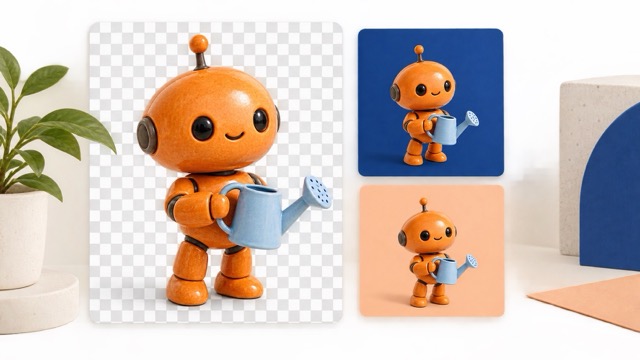
Qwen-Image-2.1 supports native transparent image generation, transparent image editing, and subject extraction. That makes transparency a useful capability to investigate with Qwen Image 2.1 free access. A Qwen Image editor can become the starting point for a character sticker, an illustrated object, or a decorative element.
For your first Qwen Image 2.1 free experiment, describe one subject with a recognizable silhouette. Specify its colors, materials, pose, and transparent background. Keep the request focused so you can judge the edges and overall shape. After generation, inspect the asset against both light and dark backgrounds before placing it in a layout.
Try this original Qwen Image editor prompt: “A friendly orange robot holding a small watering can, rounded ceramic body, soft studio lighting, full body visible, centered composition, transparent background with an alpha channel.”
Treat Qwen Image 2.1 free exploration as a chance to test how well an asset fits your intended composition. Give the Qwen Image editor a clear visual role rather than a long list of unrelated details.
Direct Image Changes with Qwen Image 2.1 free
Explore Qwen Image 2.1 free with clearer editing instructions.
The model supports up to 10 reference images and local edits guided by circles, painted annotations, or masks. Interface support may vary. For Qwen Image 2.1 free experiments, choose references that each contribute something specific. Give the Qwen Image editor an explicit relationship between the source images and your requested result.
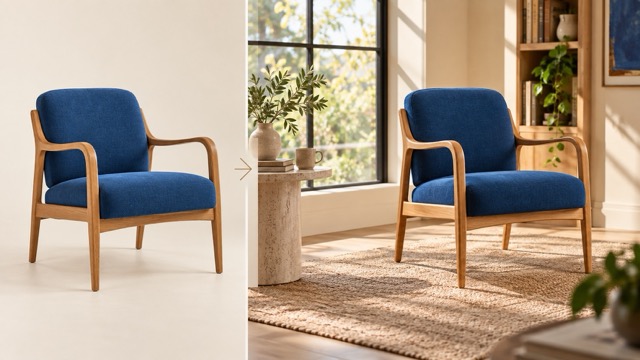
Start a Qwen Image 2.1 free editing brief with one change: replace a background, adjust a garment color, or reposition an object. Then identify the details you want retained. Review the output closely; preservation is something to assess, not assume.
Try this original Qwen Image editor instruction: “Use the chair from the reference image. Place it beside a tall window in a quiet reading room. Keep the chair's curved wooden arms and blue upholstery. Use soft morning light and leave open space on the right.”
Compare each Qwen Image 2.1 free result with its reference before requesting another change. A focused Qwen Image editor brief makes it easier to see whether the edit actually answered your request.
Shape Visual Concepts with Qwen Image 2.1 free
Build your Qwen Image 2.1 free experiment around one clear message.
Qwen highlights improvements in typography, portrait lighting, and fine detail. Explore those capabilities with Qwen Image 2.1 free options by writing a brief that prioritizes composition. Tell the Qwen Image editor where the focal point belongs and how the surrounding space should support it.
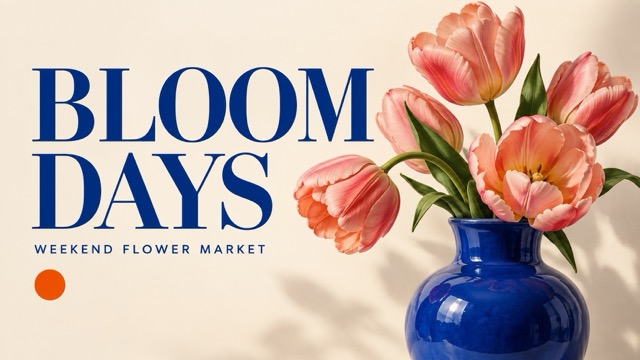
A useful Qwen Image 2.1 free experiment starts with a specific format and viewing context. For a poster concept, keep the headline short. For a portrait study, describe the light direction and expression. For an editorial illustration, identify the idea the image should communicate.
Try this original Qwen Image editor prompt: “An editorial poster concept for a fictional weekend flower market, oversized pink tulips in a cobalt vase, warm cream background, generous empty space, headline reading BLOOM DAYS, playful balanced composition.”
Review spelling, spacing, faces, and small details in every Qwen Image 2.1 free output. Use the Qwen Image editor to explore a direction, then decide what needs revision before the image serves its final purpose.
Plan Your First Qwen Image 2.1 free Experiment
Approach the Qwen Image editor with one brief and a clear way to judge the result.
1
Check access
Before trying Qwen Image 2.1 free, review the service's current credits, feature availability, and download options. Confirm that its Qwen Image editor offers the workflow you need.
2
Describe the result
Give your Qwen Image 2.1 free experiment a subject, setting, lighting style, and composition. Tell the Qwen Image editor which details matter most.
3
Review one version
Compare your Qwen Image 2.1 free output with the original brief. Check the focal point, edges, text, and reference details before asking the Qwen Image editor for changes.
4
Refine deliberately
Change one instruction at a time during Qwen Image 2.1 free exploration. Keep notes about what improved so your next Qwen Image editor request has a clearer direction.
Illustrative Creator Perspectives
Fictional testimonial drafts for review only. Names, roles, and experiences below are invented; replace them with consented feedback from verified users before publication.
My Qwen Image 2.1 free test started with a simple mascot idea. I preferred the version with fewer accessories because the silhouette was easier to read. The Qwen Image editor reminded me to settle the character's shape before adding decorative details.
Maya Bennett
Brand Designer
I approached Qwen Image 2.1 free with one product reference and a restrained room concept. I checked the product details before judging the atmosphere. My most useful lesson was to give the Qwen Image editor a specific list of features to preserve.
Daniel Ortiz
E-commerce Content Manager
For my Qwen Image 2.1 free experiment, I compared two compositions for the same announcement. The simpler concept gave the message more space. I still reviewed the lettering carefully, but the Qwen Image editor helped me think through the visual hierarchy.
Priya Shah
Social Media Strategist
I used Qwen Image 2.1 free as a sketching exercise for a small fantasy character. Removing extra background instructions made the concept easier to evaluate. I treated the Qwen Image editor output as a starting point for my own design decisions.
Oliver Chen
Independent Illustrator
My Qwen Image 2.1 free brief asked for one object with room for a slide heading. I liked having a concrete composition to critique. The Qwen Image editor output still needed review for the final layout, especially around contrast and empty space.
Amelia Brooks
Presentation Designer
I tested Qwen Image 2.1 free with a tightly defined scene instead of a broad mood description. That gave me a better basis for deciding what to revise. I found the Qwen Image editor most useful when every new instruction addressed one visible issue.
Lucas Martin
Creative Producer
Questions About Qwen Image 2.1 free
Understand model capabilities and check service terms before choosing a Qwen Image editor workflow.
Qwen Image 2.1 free refers to exploring available no-cost access options; it does not guarantee unlimited generation on this website. Check the current offer, account requirements, and usage limits. A Qwen Image editor service may set its own pricing and restrictions independently of model availability.
Give Qwen Image 2.1 free a Practical Creative Brief
Choose a focused exercise and use the Qwen Image editor to explore a visual direction.
Character and Sticker Studies
Explore Qwen Image 2.1 free with a character defined by one expression and one distinctive prop. Test whether the design remains recognizable at a small size. Ask the Qwen Image editor for a simpler version if the details compete.
Product Scene Concepts
Use Qwen Image 2.1 free exploration to compare a bright tabletop setting with a softer interior scene. Keep the product reference consistent and inspect its details. Judge how the setting supports the subject rather than selecting only for atmosphere.
Editorial Image Ideas
Give Qwen Image 2.1 free a concrete visual metaphor: a paper boat crossing a desktop sea, or a tiny garden inside a clock. Keep one central idea so the composition communicates without needing a long explanation.
Presentation Visual Studies
Try Qwen Image 2.1 free with a brief that reserves space for your own heading. Specify the subject's position and a restrained palette. Evaluate the image at slide size before choosing where text and other elements should sit.
Explore Qwen Image 2.1 free
Start with One Idea Worth Seeing
Bring a clear brief to the Qwen Image editor and evaluate what comes back. Check Qwen Image 2.1 free availability, choose an enabled workflow, and turn your next experiment into a more informed creative decision.