
Kling 4.0 AI Video Generator for More Controllable AI Videos
Turn Text, Images, and References Into Dynamic Video
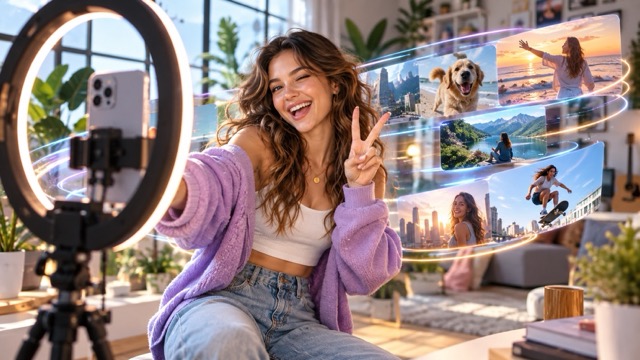
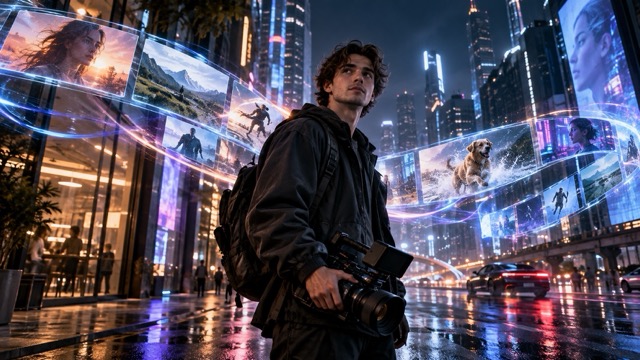
Create longer, more controlled videos with Kling 4.0 AI Video Generator. Turn text prompts, images, characters, products, and visual references into polished AI video while guiding motion, scene development, and composition. Kling 4.0 AI Video Generator combines text-to-video, image-to-video, multi-reference generation, character consistency, and advanced keyframe control in one creative workflow. Whether you are making social clips, product ads, cinematic scenes, or character stories, Kling 4.0 Video Generator gives you more control over how every shot begins, develops, and ends.
Kling 4.0 AI Video|Advanced Keyframe Control|Consistent Character Generation|Multi-Reference Video Creation
How to Use Kling 4.0 AI Video Generator
Kling 4.0 AI Video Generator keeps the creative process simple while giving you detailed control when you need it. Start with a written prompt, an image, or multiple references, configure how the video should move, and generate a finished result. The Kling 4.0 Video Generator works for quick experiments as well as more structured video projects, so beginners can start fast while experienced creators can build more deliberate scenes.
1
Add a Prompt or Reference
Describe the scene you want to create or upload an image to begin with Kling 4.0 AI Video Generator. For Kling 4.0 Text to Video, include the subject, action, environment, lighting, mood, and camera movement. For Kling 4.0 Image to Video, upload a clear image and describe how the person, object, or background should move. You can also add multiple references when visual consistency matters.
2
Set Your Video Direction
Choose the duration, aspect ratio, visual direction, references, and available keyframes inside Kling 4.0 Video Generator. Kling 4.0 AI Video Generator lets you guide important visual moments instead of leaving the entire sequence to chance. Define where a shot begins, what changes during the scene, and how you want the final frame to look.
3
Generate and Refine
Start Kling 4.0 AI Video Generator and preview the completed video. Review character identity, motion, camera behavior, scene transitions, and prompt accuracy, then adjust your description or references when you want another variation. Kling 4.0 Video Generator makes it easy to iterate until the video matches your intended story, product presentation, or visual concept.
Why Create with Kling 4.0 AI Video Generator?
Kling 4.0 AI Video Generator is designed for creators who want more than a short automatic animation. It combines longer video creation, multi-keyframe direction, stronger reference handling, and more consistent characters so each generation can follow a clearer creative plan. From a single image animation to a multi-stage narrative, Kling 4.0 Video Generator gives you practical controls for building videos that feel intentional rather than random.
Create Longer, More Complete AI Videos
Build more complete scenes with Kling 4.0 AI Video Generator instead of relying on a series of tiny disconnected clips. Kling AI 4.0 supports longer video creation that gives actions, camera movement, and scene progression more room to develop naturally. A product can move from introduction to close-up, a character can complete a sequence of actions, and a cinematic shot can establish a location before moving toward its subject. For creators producing ads, storytelling clips, music visuals, or social content, Kling 4.0 Video Generator reduces the need to repeatedly create and stitch together multiple short generations. Longer sequences also make it easier to communicate cause and effect, develop atmosphere, and create video with a clear beginning and ending.
Direct Every Stage with Multiple Keyframes
Take greater control of motion with the multi-keyframe workflow in Kling 4.0 AI Video Generator. Instead of defining only a starting image, you can guide several important points in the sequence and let Kling AI 4.0 generate movement between them. Use a starting frame to establish composition, intermediate frames to define major actions or scene changes, and an ending frame to control where the video finishes. Kling 4.0 AI Video Generator can work with up to 10 keyframes, making it useful for transformations, character movement, product demonstrations, visual transitions, and story-driven scenes. This turns Kling 4.0 Video Generator into a more directable creative tool where you decide the important visual beats while AI handles the motion connecting them.
Keep Characters and Products More Consistent
Use multiple visual references to help Kling 4.0 AI Video Generator preserve recognizable details from one shot to another. Add reference images that show a character's face, hairstyle, outfit, proportions, or signature features, then use those references to guide the generated video. For products, references can help maintain shape, color, packaging, branding, and important visual details. The multi-reference workflow in Kling AI 4.0 is especially useful for recurring characters, virtual influencers, branded mascots, product campaigns, short dramas, and story sequences. Instead of describing the same subject from scratch every time, Kling 4.0 Video Generator can use your visual references to create a stronger identity across the finished scene.
Create for Social, Widescreen, and Cinematic Formats
Build content for different screens directly with Kling 4.0 AI Video Generator. Choose a vertical format for TikTok, Reels, and Shorts, a square composition for social feeds, traditional widescreen for YouTube or advertising, or an ultra-wide cinematic format for dramatic storytelling. Kling 4.0 Video Generator supports flexible aspect ratios including 9:16, 1:1, 16:9, and 21:9, allowing the composition to match its final destination from the start. This helps creators avoid awkward cropping after generation and makes Kling AI 4.0 useful for campaigns that need several platform-ready versions of the same idea.
Create More with Kling 4.0 AI Video Generator
Kling 4.0 AI Video Generator adapts to different creative workflows instead of forcing every project into the same type of animation. Use Kling 4.0 Text to Video when you are starting with an idea, Kling 4.0 Image to Video when you already have the right visual, or multi-reference generation when consistency is important. The Kling 4.0 Video Generator can support individual creators, marketers, designers, filmmakers, social teams, and product businesses across a wide range of video tasks.
Cinematic Storytelling
Use Kling 4.0 AI Video Generator to build story-driven shots with deliberate camera movement, evolving action, visual atmosphere, and multiple key moments. Keyframe control helps define major changes in a scene while Kling AI 4.0 creates motion between them. It is ideal for concept films, visual narratives, trailers, fantasy scenes, and cinematic experiments that need more structure than a one-shot animation.
Product Videos and Advertising
Turn product photos and campaign concepts into engaging promotional clips with Kling 4.0 AI Video Generator. Use Kling 4.0 Image to Video to animate a product image, introduce camera movement, reveal details, or place the item in a more dynamic environment. Kling 4.0 Video Generator is useful for product launches, ecommerce visuals, branded social posts, advertising concepts, and short promotional videos.
Character and Creator Content
Use reference images with Kling 4.0 AI Video Generator when a recognizable person or character needs to appear consistently throughout a scene. Kling AI 4.0 can support creator avatars, fictional characters, virtual influencers, mascots, music visuals, and short-form storytelling. Multiple references give Kling 4.0 Video Generator more visual information about the identity you want to preserve.
Social Media Videos
Generate scroll-friendly creative content with Kling 4.0 AI Video Generator for TikTok, Instagram Reels, YouTube Shorts, and other social platforms. Start from text or animate an existing image, then select a suitable aspect ratio and motion style. Kling 4.0 Video Generator helps turn ideas, photos, illustrations, memes, lifestyle shots, and promotional assets into dynamic short-form video.
Why Creators Choose Kling 4.0 AI Video Generator
From faster ideation to more deliberate scene control, Kling 4.0 AI Video Generator gives different types of creators practical ways to move from a static concept to a finished video. These examples reflect common creative workflows where longer generation, keyframes, references, and flexible formats can make a meaningful difference.
I use Kling 4.0 AI Video Generator for visual concepts that are difficult to communicate with storyboards alone. The multi-keyframe workflow is especially useful because I can define several important moments before generating the scene. Kling 4.0 Video Generator gives me a much clearer way to direct transitions and camera movement.
Daniel Brooks
Creative Director
Kling 4.0 AI Video Generator fits well into our short-form content workflow. We can begin with an image we already designed, animate it, and create different formats for social channels. Kling 4.0 Video Generator helps us test visual ideas without rebuilding every scene manually.
Maya Foster
Social Media Producer
Character consistency is one of the main reasons I use Kling 4.0 AI Video Generator. When a campaign needs the same spokesperson or visual identity across different scenes, multiple references give the model more context. Kling AI 4.0 makes the workflow feel more controlled than repeatedly generating from text alone.
Ethan Carter
Brand Content Strategist
The combination of text-to-video and image-to-video makes Kling 4.0 AI Video Generator useful at different stages of a project. I can explore a new scene from a prompt, then switch to a reference-based workflow when I need more visual consistency. The Kling 4.0 Video Generator gives me flexibility without making the process complicated.
Sofia Mitchell
Motion Designer
Kling 4.0 AI Video Generator is useful for turning static product assets into more engaging campaign material. I can use a product image as the starting point and describe the camera movement or environment I want. Kling 4.0 Video Generator makes it much easier to create multiple visual directions for testing.
Lucas Bennett
Ecommerce Content Manager
Kling 4.0 AI Video Generator FAQ
Learn how Kling 4.0 AI Video Generator handles text prompts, images, keyframes, references, character consistency, video formats, and common creative workflows. These answers can help you choose the best way to start your next generation with Kling 4.0 Video Generator.
Kling 4.0 AI Video Generator is an AI-powered video creation model for turning text, images, and visual references into dynamic video. Kling AI 4.0 supports workflows such as text-to-video, image-to-video, multi-reference generation, character consistency, and multi-keyframe direction. The Kling 4.0 Video Generator is designed to give creators greater control over motion, scene development, framing, and visual continuity.
Create with Kling 4.0
Bring Your Next Video Idea to Life
Start with a sentence, an image, or a set of visual references and let Kling 4.0 AI Video Generator turn your direction into motion. Create cinematic stories, consistent character scenes, product videos, social content, and image animations with a Kling 4.0 Video Generator built for greater creative control. Explore Kling AI 4.0 today and move from idea to finished video with fewer creative compromises.