DeepSeek V4 Flash Vision is DeepSeek's experimental multimodal API model for developers who need image understanding without giving up the long context, reasoning, JSON, and tool-calling features of V4 Flash. Its exact model ID is deepseek-v4-flash-vision-exp.
Quick answer: DeepSeek V4 Flash Vision accepts text plus JPEG, PNG, GIF, or WebP images, has a 1M-token context window, and can produce up to 384K output tokens. Thinking mode is enabled by default, images are billed as input tokens, and FIM completion is not supported.
The model is available from DeepSeek's own API as an experimental release. If you are also comparing creative AI models and media workflows beyond this specific endpoint, explore the models and tools currently available on SeeAPI.
DeepSeek V4 Flash Vision at a Glance
Item | Current official specification |
|---|---|
Model ID |
|
Release status | Experimental API model, released August 21, 2026 |
Input | Text and images |
Output | Text |
Context window | 1M tokens |
Maximum output | 384K tokens |
Thinking | Enabled by default; low, high, and max effort controls |
Structured features | JSON output, tool calls, Responses API, Anthropic-compatible API |
Image formats | JPEG, PNG, GIF, WebP |
Image limit | Up to 600 images per request, subject to size and dimension limits |
FIM completion | Not supported |
The important distinction is that this is a vision-language model, not an image generator. It can read a screenshot, inspect a chart, compare photographs, or extract information from an interface, but it returns text rather than a new image.
What Is DeepSeek V4 Flash Vision?
DeepSeek V4 Flash Vision Exp adds image input to the V4 Flash family while retaining the core text and agent capabilities developers expect from the standard Flash model. DeepSeek lists the underlying version as DeepSeek-V4-Flash-Vision-Exp and exposes it through an OpenAI-compatible model ID.
That combination makes the model relevant to tasks such as:
Reading text, tables, and controls from screenshots.
Explaining charts, diagrams, product photos, and scanned documents.
Combining a large text corpus with visual evidence in one request.
Letting an agent inspect an image before choosing or calling a tool.
Returning structured JSON after visual analysis.
Because the model is marked experimental, treat the current ID, price, limits, and client compatibility as things to verify before a production rollout. Experimental does not mean unavailable; it means your integration should be easy to update or roll back.
How Image Input Works
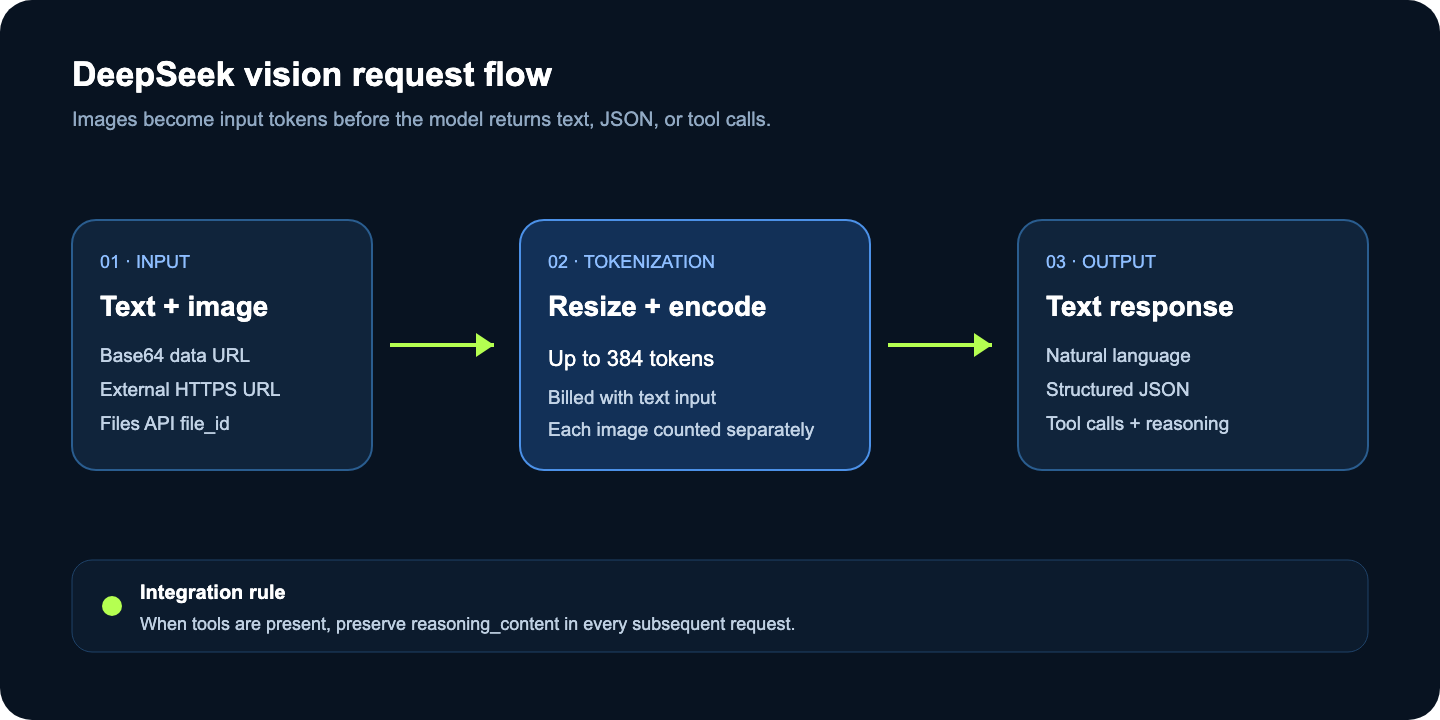
DeepSeek supports three image delivery methods in its OpenAI-compatible Chat Completions API:
A Base64-encoded data: URL for a local image.
A public HTTPS image URL.
A file_id created through the Files API.
In Chat Completions, content becomes an array containing text and image blocks. The official DeepSeek Vision guide documents the current formats and limits.
Curl Example with an Image URL
curl https://api.deepseek.com/chat/completions \
  -H "Authorization: Bearer $DEEPSEEK_API_KEY" \
  -H "Content-Type: application/json" \
  -d '{
    "model": "deepseek-v4-flash-vision-exp",
    "messages": [
      {
        "role": "user",
        "content": [
          {
            "type": "text",
            "text": "Return JSON with the chart title, trend, and any visible anomalies."
          },
          {
            "type": "image_url",
            "image_url": {
              "url": "https://example.com/chart.png",
              "detail": "original"
            }
          }
        ]
      }
    ],
    "response_format": {"type": "json_object"}
  }'
Use an external URL only when DeepSeek can fetch it without authentication and within the documented timeout. For private files, local development, or short-lived signed URLs, Base64 or the Files API is usually more predictable.
Python Example with a Local Image
import base64
import os
from openai import OpenAI

client = OpenAI(
    api_key=os.environ["DEEPSEEK_API_KEY"],
    base_url="https://api.deepseek.com",
)

with open("dashboard.png", "rb") as image_file:
    encoded = base64.b64encode(image_file.read()).decode("utf-8")

response = client.chat.completions.create(
    model="deepseek-v4-flash-vision-exp",
    messages=[
        {
            "role": "user",
            "content": [
                {"type": "text", "text": "List the three most important UI issues."},
                {
                    "type": "image_url",
                    "image_url": {
                        "url": f"data:image/png;base64,{encoded}",
                        "detail": "original",
                    },
                },
            ],
        }
    ],
)

print(response.choices[0].message.content)
Inline Base64 data counts toward the 48 MiB request-body limit. The Files API is a better fit when the same image is reused, a single file exceeds the normal 32 MiB image limit, or the full inline request becomes too large.
Image Token Billing and Pricing
DeepSeek converts every image into input tokens based on its dimensions, then bills those tokens together with the text input. Images are automatically resized before inference, and the current upper bound is 384 tokens per image. A 5,000×5,000 image therefore does not keep accumulating tokens beyond the resized maximum.
The official DeepSeek models and pricing page currently lists these rates for deepseek-v4-flash-vision-exp:
Token category | Off-peak price per 1M tokens | Peak price per 1M tokens |
|---|---|---|
Input, cache hit | $0.007 | $0.014 |
Input, cache miss | $0.22 | $0.44 |
Output | $0.66 | $1.32 |
Peak hours are 01:00–04:00 and 06:00–10:00 UTC, Monday through Friday. All other hours use the off-peak rate.
For a 384-token image billed at the cache-miss input rate, the image portion costs approximately:
Off-peak: 384 / 1,000,000 × $0.22 = $0.00008448.
Peak: 384 / 1,000,000 × $0.44 = $0.00016896.
Those figures cover only the image tokens. Add the text input, reasoning and visible output tokens, and every additional image. Cache-hit pricing should not be assumed for a first request; calculate a conservative budget with the cache-miss rate and confirm actual usage data in your logs.
The optional detail: "low" setting downsizes an image to 512×512 before inference. It can be faster and cheaper when the task does not require fine text or small visual details. Use original for screenshots, charts, or documents where downscaling may remove the evidence you care about.
Thinking and Non-Thinking Modes
Thinking mode is enabled by default with high effort. In the OpenAI-compatible Chat Completions format, you can explicitly enable or disable it with the thinking object and select low, high, or max through reasoning_effort.
response = client.chat.completions.create(
    model="deepseek-v4-flash-vision-exp",
    messages=messages,
    reasoning_effort="high",
    extra_body={"thinking": {"type": "enabled"}},
)

print(response.choices[0].message.reasoning_content)
print(response.choices[0].message.content)
Disable thinking for a straightforward extraction task when you want a shorter path to the answer:
response = client.chat.completions.create(
    model="deepseek-v4-flash-vision-exp",
    messages=messages,
    extra_body={"thinking": {"type": "disabled"}},
)
Parameters such as temperature, top_p, presence_penalty, and frequency_penalty have no effect while thinking mode is active. Do not rely on them to control a reasoning response.
Using Vision with Tool Calls
Vision and tools are most useful together when an image contains evidence that should trigger a structured action. For example, an agent can inspect a monitoring screenshot, extract a service name, and call an allowlisted status tool.
import json

tools = [
    {
        "type": "function",
        "function": {
            "name": "get_service_status",
            "description": "Get the current status of one known service.",
            "parameters": {
                "type": "object",
                "properties": {"service": {"type": "string"}},
                "required": ["service"],
            },
        },
    }
]

response = client.chat.completions.create(
    model="deepseek-v4-flash-vision-exp",
    messages=messages,
    tools=tools,
    reasoning_effort="high",
    extra_body={"thinking": {"type": "enabled"}},
)

assistant_message = response.choices[0].message
messages.append(assistant_message)

for call in assistant_message.tool_calls or []:
    result = get_service_status(**json.loads(call.function.arguments))
    messages.append({
        "role": "tool",
        "tool_call_id": call.id,
        "content": json.dumps(result),
    })
The critical rule is easy to miss: when a request includes tools, every subsequent request must preserve the assistant's reasoning_content, even if that turn did not produce a tool call. Otherwise DeepSeek returns a 400 error. Appending the complete SDK message, as shown above, preserves content, reasoning_content, and tool_calls. Custom adapters must serialize all three fields themselves.
Responses API and Anthropic-Compatible API
DeepSeek V4 Flash Vision also supports the Responses API and an Anthropic-compatible /messages endpoint.
The model capability stays the same, but the image block changes by API style:
API style | Image content block | Base URL |
|---|---|---|
OpenAI Chat Completions |
|
|
OpenAI Responses API |
|
|
Anthropic-compatible Messages |
|
|
Do not only change the base URL and assume the payload is interchangeable. A framework can be OpenAI-compatible for ordinary text while still requiring an update for the newer image content type or model capability metadata.
DeepSeek V4 Flash Vision vs V4 Flash
Capability |
|
|
|---|---|---|
Text input | Yes | Yes |
Image input | No | Yes |
Text output | Yes | Yes |
Context window | 1M | 1M |
Maximum output | 384K | 384K |
Thinking and non-thinking | Yes | Yes |
JSON and tool calls | Yes | Yes |
Responses and Anthropic APIs | Yes | Yes |
Chat prefix completion | Yes | Yes |
FIM completion | Non-thinking mode only | Not supported |
Release posture | Standard Flash route | Experimental vision route |
Choose ordinary V4 Flash when the task is text-only or depends on FIM. Choose Vision Exp when an image supplies information that cannot be represented reliably as text. Do not send decorative images: every image consumes input tokens and adds another source the model must interpret.
Current Image Limits
The present API limits are generous, but they still have clear boundaries:
JPEG, PNG, GIF, and WebP are supported.
A request body can be up to 48 MiB.
Base64 and external-URL images can be up to 32 MiB each.
A Files API file_id image can be up to 64 MiB.
A request can contain up to 600 images.
Total image data is limited to 64 MiB without file IDs or up to 200 MiB when file-ID images are included.
Maximum image dimensions are 8,192 pixels per side, reduced to 4,096 when the request contains 15 or more images.
Images are accepted only in user messages in Chat Completions; images in system or assistant messages produce a 400 error.
For PDFs, convert only the relevant pages to supported images or use a text extraction pipeline alongside selected page images. Sending hundreds of pages just because the image-count limit allows it is rarely the clearest or cheapest design.
Why Some Harnesses Still Report Text-Only
Early API and DeepSeek Harness discussions show a common integration gap: the direct DeepSeek API accepts the image, but a framework's provider definition still marks the new model as text-only. That is usually an adapter metadata problem, not evidence that the official model lacks vision.
Use this isolation checklist:
Confirm the exact model ID is deepseek-v4-flash-vision-exp.
Send a minimal image request directly to https://api.deepseek.com/chat/completions.
Verify that messages[].content is an array and the image uses an image_url block.
Capture the framework's outbound JSON and compare it with the working direct request.
Update the provider package or override its model capability metadata if the framework labels the model text-only.
Keep a raw OpenAI-compatible client as a temporary fallback until the adapter ships official support.
If the direct call also returns “This model does not support image,” check whether a gateway rewrote the model ID or routed the request to ordinary deepseek-v4-flash.
When Should You Use It?
DeepSeek V4 Flash Vision is a strong candidate for screenshot QA, chart interpretation, multimodal document review, visual agent workflows, and large-context analysis that combines images with substantial text. The low per-image token ceiling makes multi-image experiments inexpensive at current token rates, though output and long text context can still dominate the bill.
Avoid making it a hard production dependency until the experimental route, client support, and usage behavior have been validated in your own stack. Keep your image preprocessing, provider adapter, and model ID configurable.
For workflows that move from visual analysis into image creation, the distinction between understanding and generation matters. SeeAPI's article on GPT Image 2 transparent backgrounds shows a generation-focused API use case, while DeepSeek V4 Flash Vision remains an analysis model.
Frequently Asked Questions
Is DeepSeek V4 Flash Vision available through an API?
Yes. DeepSeek released deepseek-v4-flash-vision-exp as an experimental API model on August 21, 2026. Availability through third-party gateways and frameworks can differ.
Does DeepSeek V4 Flash Vision generate images?
No. It accepts images and text, then returns text. Use it for visual understanding rather than image generation.
How much does one image cost?
Images are converted into input tokens, with a current maximum of 384 tokens per image. At the cache-miss input rate, a maximum-token image contributes about $0.00008448 off-peak or $0.00016896 at peak, before text and output tokens.
Is thinking mode required?
No. Thinking is enabled by default, but it can be disabled. When thinking is enabled with tools, preserve reasoning_content across subsequent requests.
Does it support FIM completion?
No. The vision experimental model does not support FIM. Ordinary V4 Flash supports FIM only in non-thinking mode.
Why does my client say the model is text-only?
The client may have stale model capability metadata or may be sending a plain string instead of multimodal content blocks. Test the same payload directly against DeepSeek to separate a model problem from an adapter problem.
DeepSeek V4 Flash Vision brings image understanding into the V4 Flash API family without removing its long-context, reasoning, JSON, or tool capabilities. The practical path is to start with one direct image request, log the returned usage, then add framework adapters and tools only after the basic payload works. To compare that workflow with other AI model and media options, continue exploring SeeAPI.