Qwen 3.8 27B is a realistic local-agent candidate for a capable workstation: the official Q4_K_M GGUF is about 19 GB, while the full repository is much larger. A practical first setup is Q4_K_M, a 4K–8K context, one parallel request, and one allowlisted tool. The model file is only part of the memory requirement, so leave headroom for context, KV cache, runtime buffers, and other applications.
Quick answer: start small. Use Q4_K_M, confirm that short prompts and one tool call work, then increase context or permissions one variable at a time.
If the local agent is preparing a reviewed visual brief rather than the final media, hand that brief to SeeAPI's image tools or video tools for the generation step.
Qwen 3.8 27B at a Glance
Review point | Practical answer |
|---|---|
Best fit | Private code or document work, structured planning, multimodal review, and controlled agent experiments |
Recommended starting point | Q4_K_M with a 4K–8K context and one parallel request |
Main constraint | Runtime memory is higher than the model file size |
Agent requirement | A separate harness must validate tools, arguments, permissions, and results |
When to choose something smaller | When the workstation cannot leave enough memory headroom or the task does not need a 27B model |
According to the official Qwen 3.8 27B model card, Qwen3.8-27B is an Apache 2.0-licensed, dense 27-billion-parameter vision-language model. Its published specifications include text and visual input support, 64 language-model layers, and a 262,144-token native context window. Treat that native limit as a model capability, not a sensible default for every local runtime.
Long prompts, vision inputs, parallel requests, and repeated agent turns all increase memory pressure. For a first working baseline, stability is more useful than trying to maximize context immediately.
Hardware and Quantization: Leave Memory Headroom
The ranges below are conservative starting points rather than performance guarantees. Actual use changes with the runtime, GPU offload, cache format, context length, and whatever else is already using RAM or VRAM.
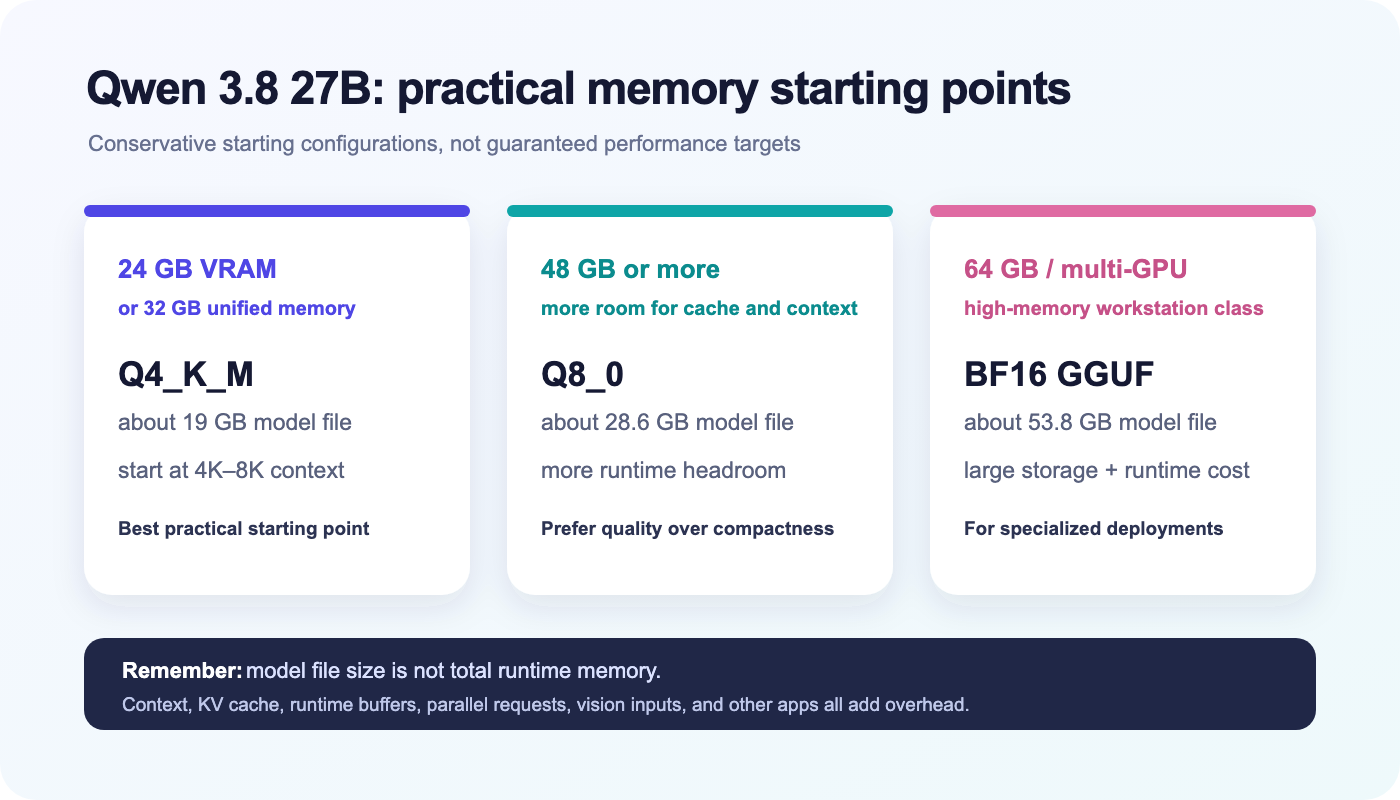
Available memory | Starting format | Published model size | Suggested first context |
|---|---|---|---|
Around 24 GB VRAM | Q4_K_M | about 19 GB | 4K–8K |
Around 32 GB unified memory | Q4_K_M | about 19 GB | 4K–8K |
48 GB or more | Q8_0 when extra quality is worth the memory | about 28.6 GB | 8K–16K |
64 GB or multi-GPU | BF16 GGUF or another serving format | about 53.8 GB for BF16 GGUF | runtime dependent |
If the model loads but leaves almost no free memory, reduce context before assuming that you need a lower-quality quantization. The local agent also needs room for the system prompt, tool results, and repeated turns.
Option 1: Run Qwen 3.8 27B with llama.cpp
Use a current llama.cpp build from its normal release or package channel. The app-style command can start the official GGUF directly:
llama cli -hf ggml-org/Qwen3.8-27B-GGUF:Q4_K_M \
  -c 8192 \
  -n 512 \
  -p "Inspect this project plan, identify the first safe task, and explain what information is still missing."
If your installation uses the traditional binary name, begin with llama-cli. To expose a local OpenAI-compatible server:
llama-server \
  -hf ggml-org/Qwen3.8-27B-GGUF:Q4_K_M \
  -c 8192 \
  --host 127.0.0.1 \
  --port 8080
Your agent framework can then send chat-completion requests to http://127.0.0.1:8080/v1/chat/completions. The initial command downloads the model, so confirm disk space and network limits before running it.
Option 2: Run the GGUF with Ollama
Ollama can run the same GGUF without waiting for a separate library tag:
ollama run hf.co/ggml-org/Qwen3.8-27B-GGUF:Q4_K_MOllama provides its native API under http://localhost:11434/api and an OpenAI-compatible interface under http://localhost:11434/v1/. Do not assume the model's full native context is enabled. Set a conservative context in a Modelfile. For endpoint behavior and supported request fields, see Ollama's official OpenAI compatibility guide.
FROM hf.co/ggml-org/Qwen3.8-27B-GGUF:Q4_K_M
PARAMETER num_ctx 8192
Then create a named local model:
ollama create qwen38-agent -f ModelfileTurn the Local Model into a Small Agent
The model endpoint is not the agent. The surrounding harness decides which tools exist, validates their arguments, executes approved actions, and sends results back to the model.
Start with one narrow tool instead of unrestricted shell or filesystem access. For example, a creative-planning agent could save only a reviewed asset brief:
{
  "type": "function",
  "function": {
    "name": "save_asset_brief",
    "description": "Save a reviewed image or video brief",
    "parameters": {
      "type": "object",
      "properties": {
        "asset_type": { "type": "string", "enum": ["image", "video"] },
        "prompt": { "type": "string" },
        "aspect_ratio": { "type": "string" }
      },
      "required": ["asset_type", "prompt", "aspect_ratio"]
    }
  }
}
Reject unknown fields instead of silently passing them to a tool.
Require confirmation before writing files, calling external services, or spending money.
Log each stage: model response, chosen tool, validated arguments, tool result, and failure state.
A Useful Local-to-Creative Workflow
Local models are useful when source material should stay on the user's machine. Specialized generation tools can handle the final media step without moving the entire reasoning workflow into the cloud.
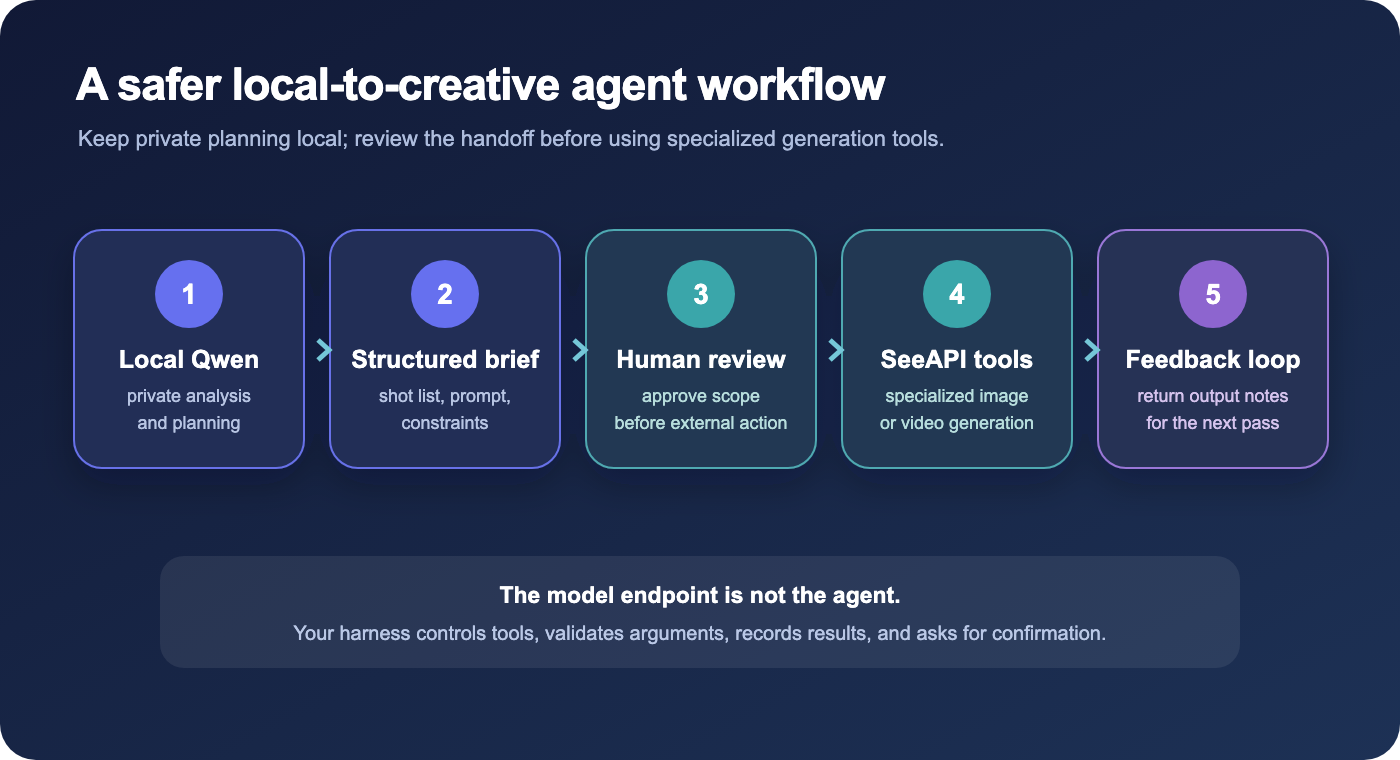
Give the local Qwen agent a product brief, campaign notes, or private repository context.
Ask it to produce a shot list, visual prompt, negative constraints, aspect ratio, and review checklist.
Review the structured brief before allowing any external action.
Create the approved visual or turn the shot list into motion with a specialized generation tool.
Return selected output notes to the local agent for metadata, copy, or the next iteration.
This division keeps planning and sensitive context local while using purpose-built creative models for final image and video generation. It is also easier to control than giving a general-purpose agent broad access to every service at once.
Recommended First Settings
Quantization: Q4_K_M
Context: 8K, or 4K if memory is tight
Parallel requests: 1
Tool access: one allowlisted tool with argument validation
Confirmation: required before files, external services, or paid actions
First task: a bounded planning, summarization, or code-inspection job
After the baseline works, change one variable at a time. Increase context only when the task needs it, then watch memory pressure and prompt-processing time.
Common Problems and What to Try
Problem | What to try first |
|---|---|
The model downloads but fails during loading | Reduce context, close memory-heavy apps, keep parallelism at one, or choose a smaller quantization. |
The response is slow before generation begins | Test a short prompt. If that works, reduce repository or document context. |
The agent answers instead of using the tool | Check that the runtime and harness pass the tool schema correctly; inspect the raw model response. |
A 24 GB GPU still runs out of memory | Remember that the 19 GB file is not the total footprint; reduce context and batch settings. |
Is Qwen 3.8 27B a Good Local Agent Model?
Yes, if you want open weights, a workstation-sized quantization, multimodal input, and a standard local endpoint—and if your hardware can leave useful memory headroom. The official GGUF path and familiar local runtimes make it a practical model to experiment with.
The trade-offs remain significant: a large download, extra memory use for long context, quality changes from quantization, and tool reliability that depends on the surrounding harness. Start with a controlled baseline, test it on your own work, and expand permissions only after the narrow workflow is stable.
For creative agent workflows, keep private planning local, then continue with SeeAPI's image tools or video tools when the final step needs specialized generation.